Retrieve Text, Metadata, or XMP From PDFs
 Extract text, retrieve metadata, or retrieve XMP metadata from PDF documents.
Extract text from a PDF using the pdf-text endpoint. Extract metadata from a PDF using the pdf-info endpoint. Extract XMP metadata from a PDF using the pdf-xmp endpoint.
Check out Getting Started and Task Roadmap if you are new to The DynamicPDF API.
Extract Text
Extract text from a PDF using the pdf-text endpoint. The following illustrates how easy it is to extract text from a PDF using this endpoint.
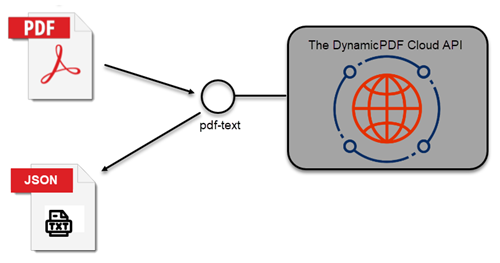
You can also specify the start page and page count properties to limit the pages to extract text from. Refer to the API documentation and the client library documentation for the pdf-text endpoint.
Calling Endpoint Directly
Call the endpoint directly by passing the API key in the request header and specifying the PDF's path as the data.
curl --location 'https://api.dpdf.io/v1.0/pdf-text'
--header 'Authorization: Bearer DP--api-key--'
--header 'Content-Type: application/pdf'
--data '@/C:/temp/solutions/text-metadata-xmp/fw4.pdf'

Calling Endpoint Using Client Library
You can also call the endpoint using a client library rather than directly. The processing and syntax are similar for all six languages.
- Create a new
PdfTextinstance and pass aPdfResourceinstance to the constructor. - Call the
PdfTextinstance'sProcessmethod and get the results as aPdfTextResponsewhich contains the extracted text as a JSON document.
- C# (.NET)
- Java
- Node.js
- PHP
- Go
- Python
- Ruby
public static void Run(String apiKey, String basePath)
{
    PdfResource resource = new PdfResource(basePath + "/fw4.pdf");
    PdfText pdfText = new PdfText(resource);
    pdfText.StartPage = 1;
    pdfText.PageCount = 2;
    pdfText.ApiKey = apiKey;
    PdfTextResponse response = pdfText.Process();
          Console.WriteLine(PrettyPrintUtil.JsonPrettify(response.JsonContent));
}
static async Run()
{
    var basePath = "C:/temp/dynamicpdf-api-usersguide-examples/";
    var apiKey = "DP.xxx-api-key-xxx";
    var resource = new PdfResource(basePath + "fw4.pdf");
    var pdfText = new PdfText(resource);
    pdfText.apiKey = apiKey;
    var res = await pdfText.process();
    if (res.isSuccessful) {
        console.log(JSON.parse(res.content));
    }
}
public static void Run(String apiKey, String basePath)
{
    PdfResource resource = new PdfResource(basePath + "fw4.pdf");
    PdfText pdfText = new PdfText(resource);
    pdfText.setApiKey(apiKey);
    PdfTextResponse response = pdfText.process();
      System.out.println(PrettyPrintUtility.prettyPrintJSON(response.getJsonContent()));
}
public static function Run()
{
    $resource = new PdfResource(PdfTextExample::$BasePath . "fw4.pdf");
    $pdfText = new PdfText($resource);
    $pdfText->ApiKey = PdfTextExample::$ApiKey;
     $response = $pdfText->Process();
     echo ($response->JsonContent);
}
func main() {

	resource := resource.NewPdfResourceWithResourcePath(basePath+"fw4.pdf", "fw4.pdf")
	txt := endpoint.NewPdfText(resource, 1, 2)
	txt.Endpoint.BaseUrl = baseUrl
	txt.Endpoint.ApiKey = apiKey

	resp := txt.Process()
	res := <-resp

	if res.IsSuccessful() == true {
		fmt.Print(string(res.Content().Bytes()))
	}
}
def pdf_text_example(apikey, full_path):
    resource = PdfResource(full_path + "fw4.pdf")
    pdf_text = PdfText(resource)
    pdf_text.api_key = apikey
    pdf_text.start_page=1
    pdf_text.page_count=2
    response = pdf_text.process()
    print(response.json_content)
  def self.run(apikey, path)
    resource = PdfResource.new("#{path}fw4.pdf")
    pdf_text = PdfText.new(resource)
    pdf_text.api_key = apikey

    response = pdf_text.process

    if response.is_successful
      puts response.json_content
    else
      puts response.error_json
    end
  end
Retrieve Metadata
Retrieve metadata from a PDF using the pdf-info endpoint. The following illustrates how easy it is to extract text from a PDF using this endpoint.
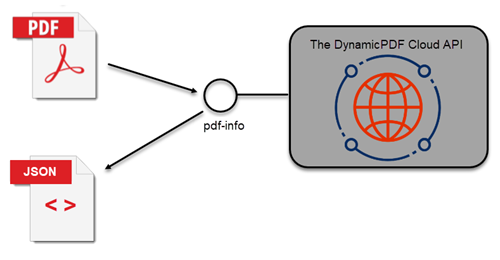
Refer to the endpoint documentation and client library documentation for the pdf-info endpoint.
Calling Endpoint Directly
Call the endpoint directly by passing the API key in the request header and specifying the PDF's path as the data.
curl --location 'https://api.dpdf.io/v1.0/pdf-info'
--header 'Authorization: Bearer DP--api-key--'
--header 'Content-Type: application/pdf'
--data '@/C:/temp/solutions/text-metadata-xmp/fw4.pdf'
Calling Endpoint Using Client Library
You can also call the endpoint using a client library rather than directly. The processing and syntax are similar for all six languages.
- Create a
PdfInfoinstance and pass aPdfResourceinstance to thePdfInfoinstance. - Call the
PdfInfoinstance'sProcessmethod to return the PDF's metadata as JSON.
- C# (.NET)
- Java
- Node.js
- PHP
- Go
- Python
- Ruby
public static void Run(string key, string basePath)
{
    PdfResource resource = new PdfResource(basePath + "/DocumentA.pdf");
    PdfInfo pdfInfo = new PdfInfo(resource);
    pdfInfo.ApiKey = key;
    PdfInfoResponse response = pdfInfo.Process();
          Console.WriteLine(PrettyPrintUtil.JsonPrettify(response.JsonContent));
}
static async Run()
{
    var resource = new PdfResource(Constants.BasePath + "get-pdf-info-pdf-info-endpoint/fw4.pdf");
    var apiKey = "DP.xxx-api-key-xxx";
    var resource = new PdfResource(basePath + "DocumentA.pdf");
    var pdfInfo = new PdfInfo(resource);
    pdfInfo.apiKey = apiKey;
    var res = await pdfInfo.process();
    if (res.isSuccessful) {
        console.log(JSON.parse(res.content));
    }
}
public static void Run(String key, String basePath) {
    PdfResource resource = new PdfResource(basePath + "DocumentA.pdf");
    PdfInfo pdfInfo = new PdfInfo(resource);
    pdfInfo.setApiKey(key);
    PdfInfoResponse response = pdfInfo.process();
        System.out.println(PrettyPrintUtility.prettyPrintJSON(response.getJsonContent()));
}
public static function Run()
{
    $resource = new PdfResource(PdfInfoExample::$BasePath . "DocumentA.pdf");
    $pdfInfo = new PdfInfo($resource);
    $pdfInfo->ApiKey = PdfInfoExample::$ApiKey;
    $response = $pdfInfo->Process();
    echo (json_encode($response));
}
func main() {
	resource := resource.NewPdfResourceWithResourcePath(basePath+"fw4.pdf", "fw4.pdf")
	text := endpoint.NewPdfInfoResource(resource)
	text.Endpoint.BaseUrl = baseUrl
	text.Endpoint.ApiKey = apiKey

	resp := text.Process()
	res := <-resp

	if res.IsSuccessful() == true {
		fmt.Print(string(res.Content().Bytes()))
	}
}
def pdf_info_example(api_key, full_path):
    resource = PdfResource(full_path + "fw4.pdf")
    pdf_info = PdfInfo(resource)
    pdf_info.api_key = api_key
    response = pdf_info.process()
    print(pprint.pformat(json.loads(response.json_content)))
  def self.run(api_key, path)
    resource = PdfResource.new("#{path}fw4.pdf")
    pdf_info = PdfInfo.new(resource)
    pdf_info.api_key = api_key

    response = pdf_info.process

    if response.is_successful
      puts JSON.pretty_generate(JSON.parse(response.json_content))
    else
      puts response.error_json
    end
  end
Retrieve XMP Metadata
Retrieve a PDF document's XMP metadata using the pdf-xmp endpoint.
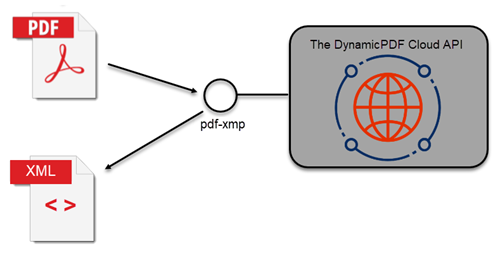
Refer to the endpoint documentation and client library documentation for the pdf-xmp endpoint.
Calling Endpoint Directly
Call the endpoint directly by passing the API key in the request header and specifying the PDF's path as the data.
curl --location 'https://api.dpdf.io/v1.0/pdf-xmp'
--header 'Authorization: Bearer DP--api-key--'
--header 'Content-Type: application/pdf'
--data '@/C:/temp/solutions/text-metadata-xmp/fw4.pdf'
Calling Endpoint Using Client Library
You can also call the endpoint using a client library rather than directly. The processing and syntax are similar for all six languages.
- Create a new
PdfXmpinstance and pass aPdfResourceinstance containing the PDF. - Call the
PdfXmpinstance'sProcessmethod and the PDF's XMP metadata is returned as XML.
- C# (.NET)
- Java
- Node.js
- PHP
- Go
- Python
- Ruby
public static void Run(String apiKey, String basePath)
{
    PdfResource resource = new PdfResource(basePath + "/fw4.pdf");
    PdfXmp pdfXmp = new PdfXmp(resource);
    pdfXmp.ApiKey = apiKey;
    XmlResponse response = pdfXmp.Process();
    Console.WriteLine(response.Content);
}
static async Run() {
    var resource = new PdfResource(Constants.BasePath + "get-pdf-info-pdf-info-endpoint/fw4.pdf");
    var apiKey = "DP.xxx-api-key-xxx";
    var resource = new PdfResource(basePath + "fw4.pdf")
    var pdfXmp = new PdfXmp(resource);
    pdfXmp.apiKey = apiKey;

    var res = await pdfXmp.process();

    if (res.isSuccessful) {
        console.log(res.content);
    }
}
public static void Run(String apiKey, String basePath)
{
    PdfResource resource = new PdfResource(basePath + "fw4.pdf");
    PdfXmp pdfXmp = new PdfXmp(resource);
    pdfXmp.setApiKey(apiKey);
    XmlResponse response = pdfXmp.process();
    System.out.println(PrettyPrintUtility.prettyPrintJSON(response.getContent()));
}
public static function Run()
{
    $resource = new PdfResource(PdfXmpExample::$BasePath . "fw4.pdf");
    $pdfXmp = new PdfXmp($resource);
    $pdfXmp->ApiKey = PdfXmpExample::$ApiKey;
    $response = $pdfXmp->Process();
    echo ($response->Content);
}
func main() {
	resource := resource.NewPdfResourceWithResourcePath(basePath+"fw4.pdf", "fw4.pdf")
	xmp := endpoint.NewPdfXmp(resource)
	xmp.Endpoint.BaseUrl = baseUrl
	xmp.Endpoint.ApiKey = apiKey

	resp := xmp.Process()
	res := <-resp

	if res.IsSuccessful() == true {
		fmt.Print(string(res.Content().Bytes()))
	}
}
def pdf_xmp_info(api_key, full_path):
    resource = PdfResource(full_path + "fw4.pdf")
    pdf_info = PdfXmp(resource)
    pdf_info.api_key = api_key
    response = pdf_info.process()
    print(response.content)
  def self.run(apikey, path)
    resource = PdfResource.new("#{path}fw4.pdf")
    pdf_xmp = PdfXmp.new(resource)
    pdf_xmp.api_key = apikey

    response = pdf_xmp.process

    if response.is_successful
      puts response.content
    else
      puts response.error_json
    end
  end
