Convert PDF to Image
 Easily convert PDFs to images using The DynamicPDF API's pdf-image endpoint.
 Convert PDFs to images using the pdf-image endpoint. Call the pdf-image endpoint directly or use one of our client libraries.
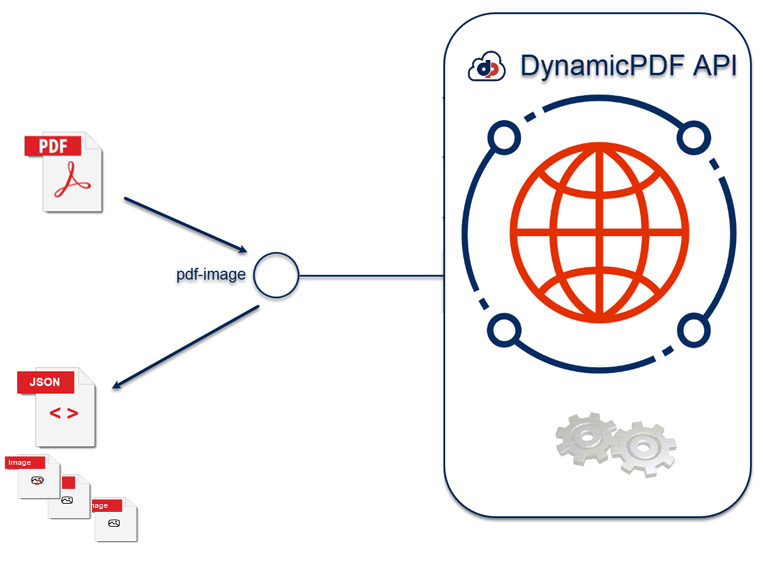
Check out Getting Started and Task Roadmap if you are new to The DynamicPDF API.
Calling Endpoint Directly
Call the pdf-image endpoint directly using a tool such as cURL or Postman. You can convert one or more pages of a PDF to one or more images using this endpoint. Each page from a PDF is rasterized and the endpoint returns a JSON document, where each image is a base64 encoded string.
Refer to the documentation for complete information on the pdf-image endpoint.
Single Page PDF
The following examples illustrate converting a PDF to an image. In the first example it converts a single page PDF to an image. In the second example it converts only the second page from a multi-page PDF.
curl https://api.dpdf.io/v1.0/pdf-image
-H"Authorization:Bearer DP--api-key--"
-F "pdf=@C:/temp/dynamicpdf-api-samples/pdf-image/onepage.pdf"
-o simple-image.png

curl "https://api.dpdf.io/v1.0/pdf-image?sp=2&pc=1"
-H"Authorization:Bearer DP--api-key--"
-F "pdf=@C:/temp/dynamicpdf-api-samples/pdf-image/multipage.pdf"
-o simple-image.png
Multi-Page PDF
The following example illustrates converting a multi-page PDF to an image.
curl https://api.dpdf.io/v1.0/pdf-image
-H"Authorization:Bearer DP--api-key--"
-F "pdf=@C:/temp/dynamicpdf-api-samples/pdf-image/multipage.pdf"
-o images.json
Calling Endpoint Using Client Library
Easily convert a PDF to an image using the xxxx class or its equivalent using the C#, Java, Node.js, PHP, Go, or Python.
Refer to the documentation for complete information on the pdf-image endpoint.
The following example illustrates converting both a single page PDF to a png image and converting a multi-page PDF to multiple png images.
- C# (.NET)
- Java
- Node.js
- PHP
- Go
- Python
- Ruby
using DynamicPDF.Api;
using DynamicPDF.Api.Imaging;
using System;
using System.IO;

namespace DynamicPdfClientLibraryExamples.Examples
{
    public class PdfImageExample
    {
        public static void Run(string apiKey, string basePath, string outputPath)
        {
            Process(apiKey, basePath + "onepage.pdf", outputPath + "png_single-output_");
            Process(apiKey, basePath + "pdfnumberedinput.pdf", outputPath + "png_multi-output_");

        }

        public static void Process(string apiKey, string basePath, string outputPath)
        {

            PdfResource resource = new PdfResource(basePath);
            PdfImage pdfImage = new PdfImage(resource);

            PngImageFormat pngImageFormat = new PngImageFormat();
            pdfImage.ImageFormat = pngImageFormat;
            pdfImage.ApiKey = apiKey;
            PdfImageResponse response = pdfImage.Process();

            if (response.IsSuccessful)
            {
                for (int i = 0; i < response.Images.Count; i++)
                {
                    File.WriteAllBytes(outputPath + i + ".png", Convert.FromBase64String(response.Images[i].Data));
                }
            }
            else
            {
                Console.WriteLine(response.ErrorJson);
            }
        }
    }
}
import fs from 'fs';
import {
    PdfImage, PdfResource, PngImageFormat} from "@dynamicpdf/api"

import {Constants} from './constants.js';
import { ClientApiUtility } from './ClientApiUtility.js';

export class PdfImageExample {

    static async Run() {
        this.ConvertPdf(Constants.BasePath + "pdf-image/onepage.pdf", "pdf-image-out");
        this.ConvertPdf(Constants.BasePath + "pdf-image/pdfnumberedinput.pdf", "pdf-multi-image-out");
    }

    static async ConvertPdf(pdfName, outName) {

       var pdfImage = new PdfImage(new PdfResource(pdfName));
       pdfImage.apiKey =  Constants.ApiKey;
       var pngImageFormat = new PngImageFormat();
       pdfImage.ImageFormat = pngImageFormat;

        var res = await pdfImage.process();

        if (res.isSuccessful) {

            for (var i = 0; i < res.images.length; i++)
                {
                    const image = res.images[i];
                    var outStream = fs.createWriteStream(Constants.OutputPath + outName + i + ".png");
                    outStream.write(Buffer.from(image.data, 'base64'));
                    outStream.close();
                }
        } else {
            console.log(res.er)
            console.log(res.errorJson);
        }
    }
}
await PdfImageExample.Run();
package com.dynamicpdf.api.examples;

import java.io.File;
import java.io.FileOutputStream;
import java.io.OutputStream;
import java.util.Base64;

import com.dynamicpdf.api.DynamicPdfCloudApiExamples;
import com.dynamicpdf.api.PdfResource;
import com.dynamicpdf.api.imaging.PdfImage;
import com.dynamicpdf.api.imaging.PdfImageResponse;
import com.dynamicpdf.api.imaging.PdfImageResponse.Image;
import com.dynamicpdf.api.imaging.PngImageFormat;

public class PdfImageExample {

	public static void main(String[] args) {

		PdfImageExample.Run(DynamicPdfCloudApiExamples.API_KEY, DynamicPdfCloudApiExamples.BASE_DIR + "/pdf-image/onepage.pdf",
				DynamicPdfCloudApiExamples.OUTPUT_PATH + "/single-image-out_");
		PdfImageExample.Run(DynamicPdfCloudApiExamples.API_KEY, DynamicPdfCloudApiExamples.BASE_DIR + "/pdf-image/pdfnumberedinput.pdf",
				DynamicPdfCloudApiExamples.OUTPUT_PATH + "/multiple-image-out_");
	}

	public static void Run(String key, String basePath, String outputPath) {


		PdfResource resource = new PdfResource(basePath);
		PdfImage pdfImage = new PdfImage(resource);
		pdfImage.setApiKey(key);

		PngImageFormat pngImageFormat = new PngImageFormat();
		pdfImage.setImageFormat(pngImageFormat);

		PdfImageResponse response = pdfImage.process();

		if (response.getIsSuccessful()) {

			for (int i = 0; i < response.getImages().size(); i++) {
				Image img = response.getImages().get(i);
				File file = new File(outputPath  + i + ".png");
				OutputStream os;
				try {
					os = new FileOutputStream(file);
					os.write(Base64.getDecoder().decode(response.getImages().get(i).getData()));
					os.close();
				} catch (Exception e) {
					e.printStackTrace();
				}

			}
		} else {
			System.out.println("errorcode: " + response.getStatusCode());
			System.out.println(response.getErrorMessage());
			System.out.println(response.getErrorJson());
		}
	}
}
include_once("constants.php");
use DynamicPDF\Api\imaging\PdfImage;
use DynamicPDF\Api\PdfResource;

class PdfImageExample
{
    public static function Run(string $apikey, string $path, string $outputPath)
    {
        PdfImageExample::Process($apikey, $path . "onepage.pdf", $outputPath . "pdfimage-single-page");
        PdfImageExample::Process($apikey, $path . "pdfnumberedinput.pdf", $outputPath . "pdfimage-multi-page");

    }

    public static function Process(string $apikey, string $path, $outputPath)
    {
        $pdfResource = new PdfResource($path);
        $pdfImage = new PdfImage($pdfResource);
        $pdfImage->ApiKey =$apikey;
        $pdfImage->ImageFormat = new PngImageFormat();

        $response = $pdfImage->Process();

        if ($response->IsSuccessful) {
            echo "the count:" . count($response->Images);
            for ($i = 0; $i < count($response->Images); $i++) {
                $imageData = base64_decode($response->Images[$i]->Data);
                $fileName = $outputPath . $i . ".png";
                file_put_contents($fileName, $imageData);
            }

        } else {
            echo json_encode($response->ErrorJson) . PHP_EOL;
        }
    }
}
PdfImageExample::Run(CLIENT_EXAMPLES_API_KEY, CLIENT_EXAMPLES_BASE_PATH . "pdf-image/", CLIENT_EXAMPLES_OUTPUT_PATH);
package main

import (
	"encoding/base64"
	"fmt"
	"os"
	"strconv"
	"github.com/dynamicpdf-api/go-client/v2/imaging"
	"github.com/dynamicpdf-api/go-client/v2/resource"
)

var basePath string
var apiKey string
var baseUrl string
var outputPath string

func init() {
	basePath = "./resources/pdf-image/"
	apiKey = "DP--api-key--"
	baseUrl = "https://api.dpdf.io"
	outputPath = "./output/pdf-image-go-output"
}

func main() {

	resource := resource.NewPdfResourceWithResourcePath(basePath+"pdfnumberedinput.pdf", "pdfnumberedinput.pdf")
	pdfImage := imaging.NewPdfImage(resource)
	pdfImage.ImageFormat = imaging.NewPngImageFormat().ImageFormat
	pdfImage.Endpoint.BaseUrl = baseUrl
	pdfImage.Endpoint.ApiKey = apiKey

	resp := pdfImage.Process()
	res := <-resp

	if res.IsSuccessful() == true {

		for i, image := range res.Images {
				img, err := base64.StdEncoding.DecodeString(image.Data)
				if err != nil {
					fmt.Print(err)
					return
				}

				filePath := outputPath + strconv.Itoa(i) + ".png"
				os.Remove(filePath)
				os.WriteFile(filePath, img, os.ModeType)
			}

		} else {
				if res.ClientError() != nil {
					fmt.Print("Failed with error: " + res.ClientError().Error())
				} else {
					fmt.Print("Failed with error: " + res.ErrorJson())
				}
		}
}
from dynamicpdf_api.imaging.pdf_image import PdfImage
from dynamicpdf_api.imaging.png_image_format import PngImageFormat
from dynamicpdf_api.pdf_resource import PdfResource
import pprint
import json
import base64
from Shared import *

def pdf_image_example(api_key, full_path):
    pdf_image_process(api_key, full_path + "onepage.pdf", "pdf-image-out-")
    pdf_image_process(api_key, full_path + "pdfnumberedinput.pdf", "pdf-multi-image-out-")


def pdf_image_process(api_key, full_path, outfile_name):
    resource = PdfResource(full_path)
    pdf_image = PdfImage(resource)
    pdf_image.api_key = api_key
    pdf_image.image_format = PngImageFormat()
    response = pdf_image.process()

    if response.is_successful:
         for i, image in enumerate(response.images):
            file_name = output_path + outfile_name + str(i) + ".png"
            with open(file_name , "wb") as out_stream:
                out_stream.write(base64.b64decode(image.data))
    else:
        print(pprint.pformat(json.loads(response.json_content)))


if __name__ == "__main__":
    pdf_image_example(api_key, base_path + "/pdf-image/", )
def pdf_image_example(api_key, full_path)
  pdf_image_process(api_key, "#{full_path}onepage.pdf", "pdf-image-out-")
  pdf_image_process(api_key, "#{full_path}pdfnumberedinput.pdf", "pdf-multi-image-out-")
end

def pdf_image_process(api_key, full_path, outfile_name)
  resource = DynamicPDF::PdfResource.new(full_path)
  pdf_image = DynamicPDF::PdfImage.new(resource)
  pdf_image.api_key = api_key
  pdf_image.image_format = DynamicPDF::PngImageFormat.new
  response = pdf_image.process

  if response.is_successful
    response.images.each_with_index do |image, i|
      file_name = "#{OUTPUT_PATH}#{outfile_name}#{i}.png"
      File.open(file_name, 'wb') do |file|
        file.write(Base64.decode64(image.data))
      end
    end
  else
    puts JSON.pretty_generate(JSON.parse(response.json_content))
  end
end
