Delete Pages From a PDF
 Delete pages form a PDF document.
 Use the pdf endpoint to extract pages from an existing PDF.
In this example you start with a nine-page document and then delete pages 4-5 and 8-9. To accomplish this page deletion, merge two copies of the same document where the first copy extracts pages 1-3 and the second document extracts pages 6-7. The following example illustrates.
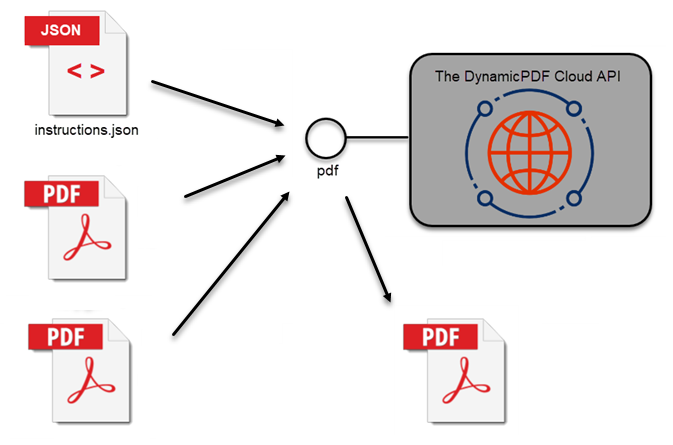
Check out Getting Started and Task Roadmap if you are new to The DynamicPDF API.
Calling Endpoint Directly
The following JSON instructions document illustrates deleting pages from a PDF. It inputs the same document twice, where the first instance only selects pages 1, 2, and 3, while the second selects pages 6 and 7, effectively deleting pages 4, 5, 9, and 10.
{
  "author": "CeteSoftware",
  "creator": "DynamicPDF API",
  "inputs": [
    {
      "type": "pdf",
      "resourceName": "pdfnumberedinput.pdf",
	  "startPage": 1,
	  "pageCount": 3
    },
	{
      "type": "pdf",
      "resourceName": "pdfnumberedinput.pdf",
	  "startPage": 6,
	  "pageCount": 2
    }
  ]
}

curl --location 'https://api.dpdf.io/v1.0/pdf'
--header 'Authorization: Bearer DP--api-key--
--form 'Instructions=@C:/temp/solutions/delete-pages/instructions.json'
--form 'Resource=@C:/temp/solutions/delete-pages/pagenumberedinput.pdf'

Calling Endpoint Using Client Library
The following JSON instructions document illustrates deleting pages from a PDF using the six different client libraries.
- C# (.NET)
- Java
- Node.js
- PHP
- GO
- Python
- Ruby
static void PerformDelete(string apiKey, string basePath, string outputPath)
{
    Pdf pdf = new Pdf();
    pdf.Author = "Test Author";
    pdf.Creator = "Test Creator";

    PdfInput input = pdf.AddPdf(new PdfResource(basePath + "pdfnumberedinput.pdf"));
    input.StartPage = 1;
    input.PageCount = 3;

    PdfInput input2 = pdf.AddPdf(new PdfResource(basePath + "pdfnumberedinput.pdf"));
    input2.StartPage = 6;
    input2.PageCount = 2;

    pdf.ApiKey = apiKey;
    PdfResponse response = pdf.Process();

    File.WriteAllBytes(outputPath + "/delete-pages-output.pdf", response.Content);
}
static async Run() {
    var pdf = new Pdf();
    var pdfInput = pdf.addPdf(new PdfResource(Constants.BasePath + "pdfnumberedinput.pdf"));
    pdfInput.startPage = 1;
    pdfInput.pageCount = 3;

    var pdfInput = pdf.addPdf(new PdfResource(Constants.BasePath + "delete-pages/pdfnumberedinput.pdf"));
    pdfInput.startPage = 6;
    pdfInput.pageCount = 2;

    pdf.apiKey =  Constants.ApiKey;

    var res = await pdf.process();

    if (res.isSuccessful) {
         var outFile = Constants.OutputPath + "delete-pages-output.pdf";
        var outStream = fs.createWriteStream(outFile);
        outStream.write(res.content);
        outStream.close();
    } else {
        console.log(res.errorJson);
    }
}
public static void Run(String apiKey, String basePath)
{
    Pdf pdf = new Pdf();
	pdf.setApiKey(apiKey);
	pdf.setAuthor("John Doe");
	pdf.setTitle("My Blank PDF Page");
	pdf.setCreator("Test Creator");
	pdf.setTag(false);

	PdfInput pdfInput = pdf.addPdf(new PdfResource(basePath + "pdfnumberedinput.pdf"));
	pdfInput.setStartPage(1);
	pdfInput.setPageCount(3);

	PdfInput pdfInput2 = pdf.addPdf(new PdfResource(basePath + "pdfnumberedinput.pdf"));
	pdfInput2.setStartPage(6);
	pdfInput2.setPageCount(2);

	PdfResponse pdfResponse = pdf.process();

	try {
			FileUtils.writeByteArrayToFile(new File(DynamicPdfCloudApiExamples.OUTPUT_PATH + "/delete-pages-output.pdf"), pdfResponse.getContent());
		} catch (IOException e) {
			e.printStackTrace();
		}
}
public static function Run(string $apikey, string $path, string $output_path)
{
    $pdf = new Pdf();
    $pdf->ApiKey = $apikey;

    $pdfInput = $pdf->AddPdf(new PdfResource($path . "pdfnumberedinput.pdf"));
    $pdfInput->StartPage = 1;
    $pdfInput->PageCount = 3;

    $pdfInput2 = $pdf->AddPdf(new PdfResource($path . "pdfnumberedinput.pdf"));
    $pdfInput2->StartPage = 6;
    $pdfInput2->PageCount = 2;

    $response = $pdf->Process();

    if($response->IsSuccessful)
    {
        file_put_contents($output_path . "delete-pages-output.pdf", $response->Content);
    } else {
        echo("Error: ");
        echo($response->StatusCode);
        echo($response->ErrorJson);
    }
}
func main() {

	pr := endpoint.NewPdf()
	pr.Endpoint.BaseUrl = "https://api.dpdf.io/"
	pr.Endpoint.ApiKey = "DP--api-key--"
	pdfResource := resource.NewPdfResourceWithResourcePath(basePath+"pdfnumberedinput.pdf", "pagenumberedinput1.pdf")
	prInput := input.NewPdfWithResource(pdfResource)
	prInput.StartPage = 1
	prInput.PageCount = 3

	pr.Inputs = append(pr.Inputs, prInput)

	pdfResource2 := resource.NewPdfResourceWithResourcePath(basePath + "pdfnumberedinput.pdf", "pagenumberedinput2.pdf")
	prInput2 := input.NewPdfWithResource(pdfResource2)
	prInput2.StartPage = 6
	prInput2.PageCount = 2

	pr.Inputs = append(pr.Inputs, prInput2)

	resp := pr.Process()
	res := <-resp

	if res.IsSuccessful() == false {
		if res.ClientError() != nil {
			fmt.Print("Failed with error: " + res.ClientError().Error())
		} else {
			fmt.Print("Failed with error: " + res.ErrorJson())
		}
	} else {
		os.WriteFile(outputPath,
			res.Content().Bytes(), os.ModeType)
	}
}
def delete_pages(apikey, full_path):
    pdf=Pdf()
    pdf.api_key=apikey
    inputA = pdf.add_pdf(PdfResource(full_path + "pdfnumberedinput.pdf"))
    inputA.start_page = 1
    inputA.page_count = 3

    inputB = pdf.add_pdf(PdfResource(full_path + "pdfnumberedinput.pdf"))
    inputB.start_page = 6
    inputB.page_count = 2

    response = pdf.process()

    if response.is_successful:
         with open(output_path + "delete-pages-output.pdf", "wb") as output_file:
            output_file.write(response.content)
    else:
        print(response.error_id)
        print(response.error_message)
        print(response.error_json)
  def self.run(apikey, path, output_path)
    pdf = Pdf.new
    pdf.api_key = apikey

    pdf_input = pdf.add_pdf(PdfResource.new("#{path}pdfnumberedinput.pdf"))
    pdf_input.start_page = 1
    pdf_input.page_count = 3

    pdf_input2 = pdf.add_pdf(PdfResource.new("#{path}pdfnumberedinput.pdf"))
    pdf_input2.start_page = 6
    pdf_input2.page_count = 2

    response = pdf.process

    if response.is_successful
      File.open("#{output_path}delete-pages-output.pdf", 'wb') { |file| file.write(response.content) }
    else
      puts response.error_json
    end
  end
The pdf endpoint takes a JSON instructions document that provides instructions for creating, transforming, merging, and formatting inputs into a combined PDF. Refer to documentation on the instructions schema for information on how to use the pdf endpoint.
