Integration with Make
 The DynamicPDF API provides integration with the Make visual platform so you can easily integrate PDF capabilities into your existing Make workflows.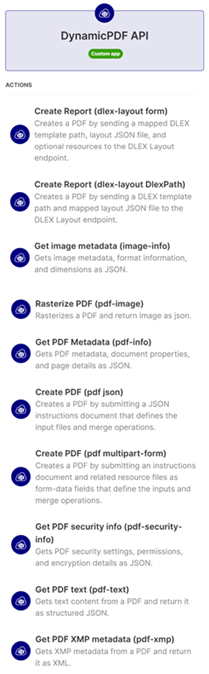
The DynamicPDF API Make App has the following modules:
Authentication
All authentication is through a top-level field named DynamicPDF API Key.

- Use a DynamicPDF API Key starting with
DP.(example:DP.R2mx...). - Enter the key into the DynamicPDF API Key field when configuring the module.
- Credentials are stored securely by Make and applied via
Authorization: Bearerheader. - No OAuth or refresh tokens are required.
Be certain to check-out the tutorial: Using the DynamicPDF API Make App.
Modules
dlex-layout (multipart-form)
Render a PDF by sending a DLEX template path, layout JSON file, and optional resource files as multipart form-data.
| Field | Type | Note |
|---|---|---|
| LayoutData File Name | text | The layout data filename. Usually 'layout.json' or 'instructions.json'. |
| LayoutData File (data) | data buffer | Map the JSON file containing the layout data. |
| Resources | array | Array of resource files to be used in the layout. |
| Resource File Name | text | The Resource filename. |
| Resource File Data | data buffer | Map the file containing the resource data. |
dlex-layout (DlexPath)
Render a PDF by providing a stored DLEX template path and a layout JSON file.
| Field | Type | Note |
|---|---|---|
| LayoutData File Name | text | The layout data filename. Usually 'layout.json' or 'instructions.json'. |
| LayoutData File (data) | data buffer | Map the JSON file containing the layout data. |
| Dlex Path | text | The path to the .dlex template stored in DynamicPDF API Storage. Example: /templates/invoice.dlex |

image-info
Generate a PDF by submitting an instructions document and related resource files as multipart form-data fields.
| Field | Type | Note |
|---|---|---|
| Image Binary | data buffer | Binary image file to process. |
| Image MIME Type | image/png, image/jpeg, image/gif, image/bmp, image/tiff | MIME type of the uploaded image file. |
pdf-image
Rasterize a PDF and return page images and related data as JSON.
| Field | Type | Note |
|---|---|---|
| PDF File Name | text | Name of the PDF file. |
| PDF File Data | data buffer | Binary PDF file to process. |
| Start page number (sp) | number | 1-based page number. Default: 1 |
| Page count (pc) | number | Number of pages to convert. Default: 0 (all pages) |
| Image format (if) | PNG, JPEG, GIF, BMP, TIFF | Output image format. Default: png |
| Quality (qt) | 1–100. Default: 60 | |
| Dithering percent (dp) | 1–100. Default: 25 | |
| Dithering algorithm (da) | Floyd-Steinberg, Bayer, None | Dithering algorithm to use when reducing color depth. |
| Color format (cf) | RGB, Monochrome, Indexed | Color format of the output image. Default: rgb |
| Multi-page (mp) | boolean | true to return multi-page image formats (e.g., multi-page TIFF). Default: false |
| Black threshold (bt) | number | 0–255. Applies to monochrome output. |
| Quantization algorithm (qa) | Octree, Web-safe, Werner, Wu | Color quantization algorithm to use when reducing color depth. |
| Image size mode | dpi, fixed , max, percentage-dpi | Image sizing mode. |
| Horizontal DPI (hd) | number | Default: 96 |
| Vertical DPI (vd) | number | Default: 96 |
| Height (ht) | number | Height in the specified unit. |
| Width (wd) | number | Width in the specified unit. |
| Unit (ut) | Point, Inch, Millimeter | Unit of measurement for width and height. |
| Max height (mh) | number | Max height in the specified unit. |
| Max width (mw) | number | Max width in the specified unit. |
| Vertical percentage (vp) | number | 1–100. Default: 100 |
pdf-info
Extract PDF metadata, document properties, and page details as structured JSON.
| Field | Type | Note |
|---|---|---|
| PDF Binary | data buffer | Binary PDF file to process. |
pdf (JSON)
Generate a PDF by submitting a JSON instructions document that defines input files and merge operations.
| Field | Type | Note |
|---|---|---|
| Instructions.json (file data)) | data buffer | Binary Instructions.json file defining PDF merge and processing operations. |
pdf (multipart-form)
Generate a PDF by submitting an instructions document and related resource files as multipart form-data fields.
| Field | Type | Note |
|---|---|---|
| Instructions filename | text | The name of the Instructions.json file. |
| Instructions File (data) | data buffer | Binary Instructions.json file defining PDF merge and processing operations. |
| Resources | array | Optional resource files to be used during PDF processing (e.g., images, fonts). |
| Resource File Name | text | The Resource filename. |
| Resource File Data | data buffer | Map the file containing the resource data. |
pdf-security-info
Extract PDF security settings, permissions, and encryption details as JSON.
| Field | Type | Note |
|---|---|---|
| PDF Binary | data buffer | Binary PDF file to process. |
pdf-text
Extract text content from a PDF and return it as structured JSON.
| Field | Type | Note |
|---|---|---|
| PDF Binary | data buffer | Binary PDF file to process. |
| Start Page | uinteger | Page number to start extraction from. |
| Page Count | uinteger | Number of pages to extract. |
| Text Order | Stream, Visible, Visible Extra Space | Display order for extracted text and if extra space included or excluded. |
pdf-xmp
Extract XMP metadata from a PDF and return it as XML.
| Field | Type | Note |
|---|---|---|
| PDF Binary | data buffer | Binary PDF file to process. |
Input Requirements & File Handling
- DLEX templates must exist in DynamicPDF Cloud Storage (example:
/templates/invoice.dlex). - Layout / Instructions JSON must be a
.jsonfiles. - Multipart fields require a filename field when mapping file uploads (Make requirement).
- Binary fields must be mapped directly from prior modules (Drive, Dropbox, Email, HTTP, etc.).
- Multiple PDFs, images, or resources may be included as additional multipart file fields.
Usage Notes
- DLEX Layout and PDF generation modules support both JSON-only and multipart-form workflows.
- Analysis modules (
pdf-info,pdf-text,pdf-xmp,pdf-security-info,image-info) accept raw binary uploads. - Outputs may be JSON (analysis results) or binary (generated PDFs).
- Outputs can be routed to storage, email, signing, OCR, or downstream automation steps.
- All processing is server-side; no local runtimes or PDF engines are required.