Integration with Zapier
 The DynamicPDF API provides integration with the Zapier platform so you can easily integrate PDF capabilities into your existing Zapier workflows.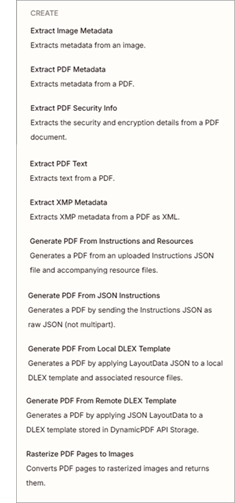
The DynamicPDF API Zapier Integration has the following modules.
- Generate PDF From Local DLEX Template (dlex-layout - local resources)
- Generate PDF From Remote DLEX Template (dlex-layout - DlexPath)
- Extract Image Metadata (image-info)
- Rasterize PDF Pages to Images (pdf-image)
- Extract PDF Metadata (pdf-info)
- Generate PDF From JSON Instructions (pdf - JSON)
- Generate PDF From Instructions and Resources (pdf - multipart-form)
- Extract PDF Security Info (pdf-security-info)
- Extract PDF Text (pdf-text)
- Extract PDF Metadata (pdf-xmp)
Authentication
All authentication is through a top-level field named DynamicPDF API Key.
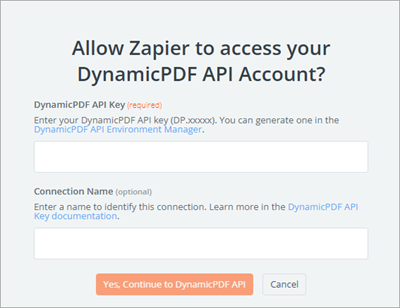
Refer to Apps and API Keys for more information on assigning an API key.
- Use a DynamicPDF API Key starting with
DP.(example:DP.R2mx...). - Enter the key into the DynamicPDF API Key field when configuring the module.
- Credentials are stored securely by Zapier and applied via
Authorization: Bearerheader. - No OAuth or refresh tokens are required.
- Authentication is validated by performing a test PDF request during connection setup
Actions
The DynamicPDF API Zapier App includes the following actions.
Be certain to check-out the tutorial: Using the DynamicPDF API Zapier App.
dlex-layout (local resources)
Render a PDF by submitting a local DLEX template, layout JSON file, and optional resource files as multipart form-data. Use this action when your layout references external resources such as images, fonts, or data files (dlex-layout).
| Field | Type | Note |
|---|---|---|
| LayoutData File Name | text | Usually layout.json or instructions.json |
| LayoutData File (data) | file | JSON layout data mapped from a prior step |
| Resources | line-item files | Optional resource files used by the layout |
| Resource File Name | text | Resource filename |
| Resource File Data | file | Binary resource file |
dlex-layout (DlexPath)
Render a PDF by referencing a DLEX template already stored in DynamicPDF API cloud storage and supplying a layout JSON file (dlex-layout).
| Field | Type | Note |
|---|---|---|
| LayoutData File Name | text | Usually layout.json or instructions.json |
| LayoutData File (data) | file | JSON layout data |
| DlexPath | text | Path to stored DLEX file (example: /templates/invoice.dlex) |

image-info
Analyze an image file and return metadata and technical details as JSON (image-info).
| Field | Type | Note |
|---|---|---|
| Image Binary | file | Binary image file |
| Image MIME Type | enum | image/png, image/jpeg, image/gif, image/bmp, image/tiff |

pdf-image
Rasterize a PDF and return page images and related rendering data as JSON (pdf-image).
| Field | Type | Note |
|---|---|---|
| PDF File Name | text | Name of the PDF file |
| PDF File Data | file | Binary PDF |
| Start page number (sp) | number | 1-based page number |
| Page count (pc) | number | Number of pages to convert |
| Image format (if) | enum | PNG, JPEG, GIF, BMP, TIFF |
| Quality (qt) | number | 1–100 |
| Dithering percent (dp) | number | 1–100 |
| Dithering algorithm (da) | enum | Floyd-Steinberg, Bayer, None |
| Color format (cf) | enum | RGB, Monochrome, Indexed |
| Multi-page (mp) | boolean | Enable multi-page image formats |
| DPI / size options | number | DPI, fixed, max, or percentage scaling |

pdf-info
Extract PDF metadata, document properties, and page details as structured JSON (pdf-info).
| Field | Type | Note |
|---|---|---|
| PDF Binary | file | Binary PDF file |
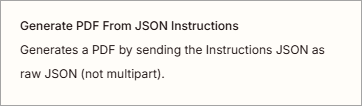
pdf (JSON)
Generate a PDF using a JSON instructions document that defines inputs and merge operations (pdf - JSON).
| Field | Type | Note |
|---|---|---|
| Instructions.json | file | JSON instructions defining PDF operations |
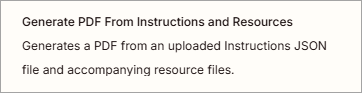
pdf (multipart-form)
Generate a PDF using an instructions document plus optional resource files (pdf - multipart form).
| Field | Type | Note |
|---|---|---|
| Instructions filename | text | Name of the instructions file |
| Instructions File (data) | file | Instructions.json |
| Resources | line-item files | Optional images, fonts, or PDFs |
| Resource File Name | text | Resource filename |
| Resource File Data | file | Binary resource file |

pdf-security-info
Extract PDF security settings, permissions, and encryption details as JSON (pdf-security-info).
| Field | Type | Note |
|---|---|---|
| PDF Binary | file | Binary PDF file |

pdf-xmp
Extract XMP metadata from a PDF and return it as XML (pdf-xmp).
| Field | Type | Note |
|---|---|---|
| PDF Binary | file | Binary PDF file |
pdf-text
Extract text content from a PDF and return it as structured JSON (pdf-text).
| Field | Type | Note |
|---|---|---|
| PDF Binary | file | Binary PDF |
| Start Page | number | Starting page number |
| Page Count | number | Number of pages to extract |
| Text Order | enum | Stream, Visible, Visible Extra Space |
Input Requirements & File Handling
- Layout and instruction files must be valid
.jsondocuments. - Zapier file inputs must be mapped from upstream steps (Drive, Email, Webhooks, Code, etc.).
- Binary file fields must be mapped directly; base64 is not required.
- Multipart actions require both a filename field and a file field (Zapier requirement).
- Multiple PDFs, images, or resource files may be included as line-items.
Usage Notes
- PDF generation actions support both JSON-only and multipart workflows.
- Analysis actions (
pdf-info,pdf-text,pdf-xmp,pdf-security-info,image-info) accept raw binary uploads. - Outputs are returned as structured JSON or binary PDF files.
- Results can be routed to storage, email, OCR, signing, or downstream automation steps.
- All processing is performed by the DynamicPDF API.